Undo and Redo Functions
The Undo and Redo Functions
Learning Objectives
- Understanding the function of the undo and redo buttons.
- Understanding how the undo and redo buttons are accessed.
- Understanding the parameters of the undo button.
The Undo function allows you to reverse an action. This function is useful when you have made a mistake in your spreadsheet and want to go back to the way the spreadsheet looked before.
Warning: You cannot undo actions such as deleting a sheet or sheet tab, saving a spreadsheet, or changing the options. You can only undo things inside your spreadsheet.
Warning: You cannot undo actions such as deleting a sheet or sheet tab, saving a spreadsheet, or changing the options. You can only undo things inside your spreadsheet.
The Undo function
To use the undo function, press the function in the Ribbon.
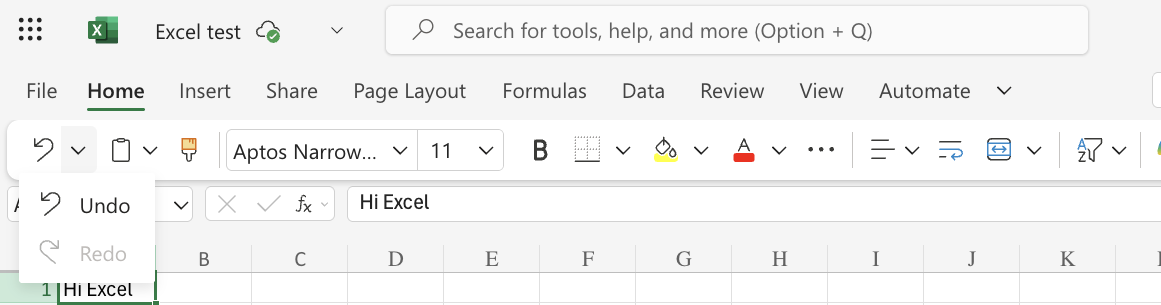
Tip: You can also use the keyboard shortcut CTRL + Z/Command + Z to undo actions.
The Redo function
The redo function, on the other hand, reverses the Undo action. This is helpful when you regret using the undo function. To use the Redo function, press the button in the Ribbon. It should be placed directly under the Undo button.
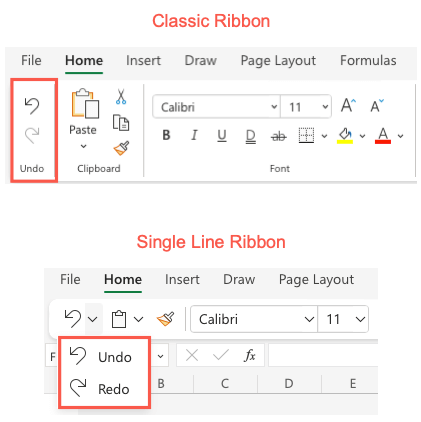
Tip: You can also use the keyboard shortcut, CTRL + Y/Command + Y
Warning:The Redo command is only available if you have used the Undo function.